
The OBSBOT Meet SE 2 is a small, genuinely clever fix: an AI-powered 2K webcam for $79 that re-frames you automatically while you talk, teach or stream.
It is now available at Pergear in three colors: Space Grey, Cloud White and Aurora Green. See the OBSBOT Meet SE 2 →

What is the OBSBOT Meet SE 2?
The Meet SE 2 is a compact USB-C webcam built around two ideas: clear 2K imaging and AI framing that keeps up with you. It sits in OBSBOT's Meet SE line, which was designed to bring AI camera features to a sub-$100 price point. The second generation doubles the resolution story — where the original Meet SE topped out at 1080p, the Meet SE 2 records up to 2K at 30fps and 1080p at 100fps.
That 100fps mode matters more than it sounds. Hand gestures, product demos, and fast movement look noticeably smoother, which is exactly where most webcams fall apart.
Key specs at a glance
| Resolution | 2K@30fps / 1080p@100fps |
| Sensor | 1/2.8″ stacked CMOS, f/1.8, dual native ISO |
| HDR | Staggered HDR |
| AI features | Auto framing, gesture control, portrait/landscape |
| Field of view | 78° diagonal, 4x digital zoom |
| Audio | Built-in mic with noise reduction and auto gain |
| Size | 45 x 36 x 22.2 mm |
| Price | $79 at Pergear |
AI Auto Framing: the feature you will actually notice
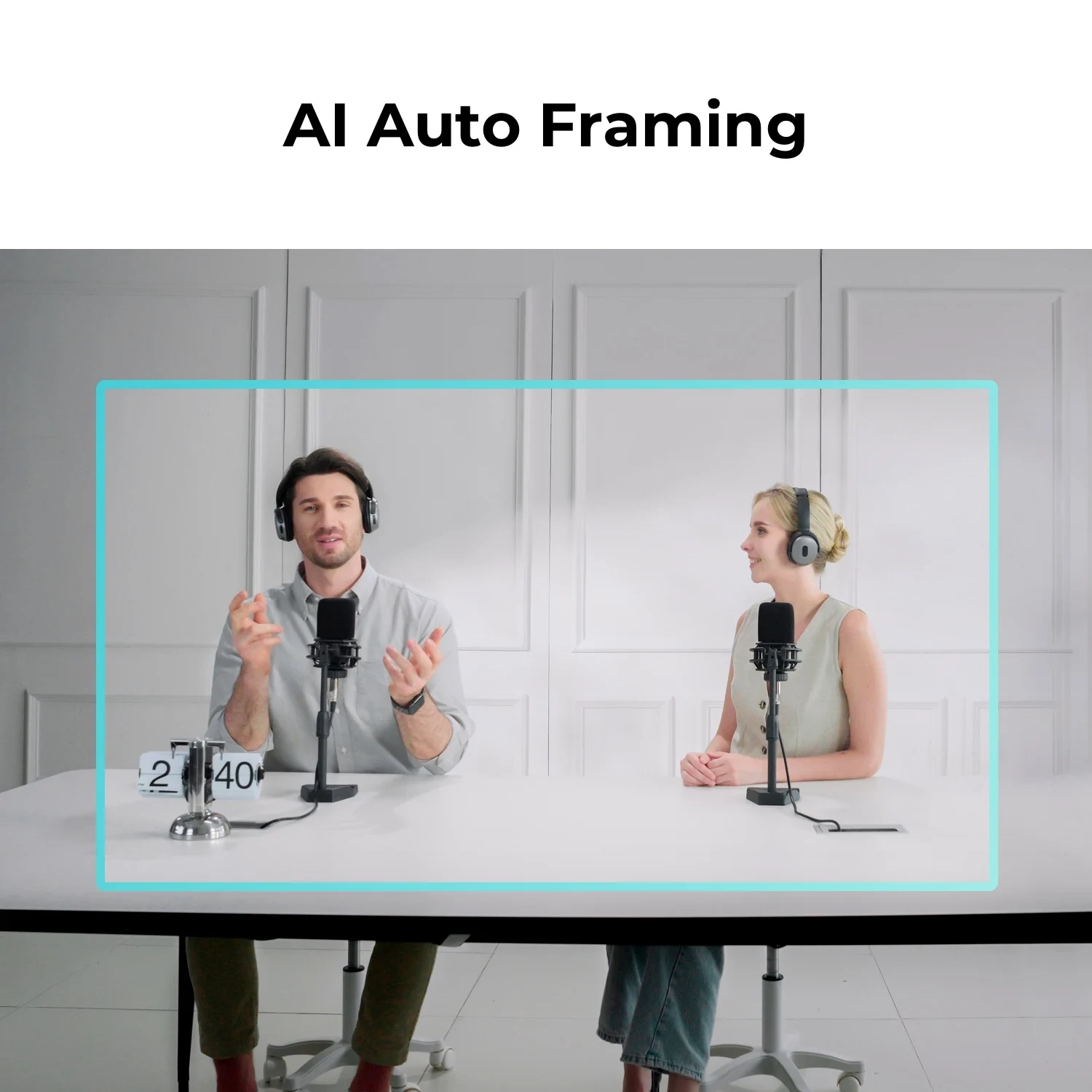
Most webcams have a fixed field of view. You either sit exactly where the camera expects, or you spend the meeting adjusting. The Meet SE 2 instead uses AI to detect people and adjust framing in real time — one person presenting, two people at a desk, or someone leaning over to show a document.
It works in both landscape and portrait, which makes it unusually practical for vertical content. Rotate the mount and the camera follows the new orientation; even mount it upside down and the image flips automatically.
Gesture control: stop touching your software mid-call
Gesture Control is the sleeper feature. Instead of alt-tabbing to a control panel, you raise a hand to zoom in or lock and unlock a framing target. On a client call, that is the difference between looking composed and looking like you are debugging a laptop.
Image quality where it counts
A 1/2.8″ stacked CMOS sensor sounds unremarkable on paper — until you look at what it does with bad light. The f/1.8 aperture and dual native ISO help the camera hold detail in a dim room, while Staggered HDR balances a bright window behind you against a darker foreground. If your desk faces a window, this is the part of the spec sheet that will matter every single day.
The 78° diagonal field of view is a sensible middle ground too: wide enough to include a second person or a whiteboard, without the stretching at the edges that ultra-wide webcams produce.
OBSBOT Meet SE 2 vs Meet 2 vs Meet SE: which should you buy?
| Model | Resolution | Best for | Price |
|---|---|---|---|
| Meet SE 2 | 2K@30 / 1080p@100 | Best value AI framing | $79 |
| Meet 2 | 4K@30 | Maximum detail | $129 |
| Meet SE (1st gen) | 1080p | Entry-level setups | Lower cost |
Short version: choose the Meet SE 2 if you want 2K and AI framing at the lowest sensible price. Step up to Meet 2 only if you genuinely need 4K detail — for example, cropping into a 1080p timeline or showing fine textures on camera.
Who is the Meet SE 2 for?
- Remote workers and hybrid teams who spend hours on Zoom, Teams or Google Meet and want to look sharp without a lighting rig.
- Streamers and creators who want auto framing in portrait or landscape without babysitting OBS.
- Teachers and trainers who move around while presenting, and need the camera to keep up.
- Podcasters and interviewers who want a second angle without a second operator.
- Travelers — at roughly the size of a small chocolate bar, it disappears into a laptop bag.
Does it work with your apps and computer?
Yes. The Meet SE 2 is a standard USB-C UVC device, so it works with Zoom, Microsoft Teams, Google Meet, OBS Studio, Discord, StreamYard and most other software without special drivers. The OBSBOT desktop app adds Beauty Mode, Background Blur, framing adjustments and firmware updates.
In the box you get the camera, a magnetic mount, a privacy cover, a USB-C to USB-C cable and a USB-C to USB-A adapter — so it works with newer laptops and older USB-A ports alike.
Frequently asked questions
Is the OBSBOT Meet SE 2 worth it?
If you want a meaningful jump over a built-in laptop webcam without spending $150+, it is one of the strongest options in its class. 2K resolution, AI auto framing, HDR and gesture control at $79 is a lot of camera for the money.
Does the Meet SE 2 have a microphone?
Yes — a built-in mic with noise reduction and auto gain. It is fine for calls and casual streaming; for studio-quality audio, pair it with a dedicated microphone.
Can the Meet SE 2 record in portrait for TikTok and Reels?
Yes. Rotate the magnetic mount to portrait mode and the camera switches orientation. It also auto-flips the image if you mount it upside down.
What is the difference between Meet SE and Meet SE 2?
The second generation steps up to 2K@30fps and adds faster 1080p@100fps capture, while keeping the compact design and AI framing that made the original popular.
Where can I buy the OBSBOT Meet SE 2?
Right here at Pergear, in Space Grey, Cloud White and Aurora Green, with fast shipping and a 12-month warranty.
Get the OBSBOT Meet SE 2 at Pergear
2K imaging, AI auto framing, gesture control and a genuinely pocketable body — at $79.